How to Use ChatGPT in Other Apps on Your Phone (Android and iPhone)

You are halfway through a WhatsApp reply, or an email to your manager, and you want a bit of help. Maybe the message sounds too blunt, maybe you need a quick fact, or maybe you just want someone to write the first draft. So you copy the text, open ChatGPT, paste it in, wait, copy the answer, go back to the chat, and paste again.
It works, but doing that five times a day gets old fast.
That is why people search for a “ChatGPT keyboard.” You want the help right where you are typing, without taking a small tour of your phone every time you need a better sentence.
There are a few ways to get closer to that. Some let you reach ChatGPT while using another app. Others, including AI keyboards like Acti, put writing tools and an assistant directly in your keyboard.
Let’s start with the question you probably came here for.
Is there a ChatGPT keyboard?
Not from OpenAI. The official ChatGPT mobile app is a separate app, rather than a keyboard you select for everyday typing. Apps advertised as “ChatGPT keyboards” are made by other developers.
But if you are searching for one, you probably care more about what it can help you do:
- Fix the grammar in a message.
- Make a reply sound less rude or more natural.
- Write something when you don’t know how to start.
- Translate a message.
- Ask a quick question without opening another app.
You don’t necessarily need a keyboard called ChatGPT to do those things.
You can use ChatGPT through supported phone features, check the writing tools already on your device, or use an AI keyboard. These are different products, but they can solve some of the same everyday problems.
Acti, for example, is an everyday keyboard with swipe typing, autocorrect, and word suggestions. It also has Aki, an assistant with its own toolbar button, and Acts, reusable workflows for tasks such as rewriting, translating, and drafting replies.
We’ll cover the different routes below, including where they save you time and where you still have to copy the answer back yourself.
1. Send text to ChatGPT through your phone’s sharing options
Before changing your keyboard or setting up shortcuts, check whether your phone already lets you share text to ChatGPT.
If ChatGPT appears in the sharing menu, this can save you a few taps. It still opens ChatGPT, though, so think of it as a quicker handoff rather than an assistant inside your message box.
On Android
- Select the text you want help with.
- Look for Share in the menu. You may need to tap the three dots.
- If ChatGPT appears, select it.
- Check the text and add your instruction, such as “make this more polite.”
- Review the answer and copy it back into your message.
On iPhone
- Select the text and look for Share.
- Check whether ChatGPT appears among the available apps.
- If it does, select it and explain what you want.
- Review the result and bring it back to your original app.
Not seeing ChatGPT? Use copy and paste instead. Sharing options depend on the app and phone, and some apps won’t let you share selected text this way.
Also, Forward is not always the same as Share. In a messaging app, it may only forward the message to another conversation.
Good for: sending a longer passage to ChatGPT and asking follow-up questions.
The catch: you still leave the original app, and the answer usually needs to be brought back manually.
2. Open an assistant while using another app on Android
If you mainly want to ask quick questions, opening an assistant with a button or gesture can be easier than finding its app each time.
Android lets you choose a default digital assistant. Which apps appear and how you open them depends on your phone.
Check whether you can choose ChatGPT
- Install or update the ChatGPT app and sign in.
- Open your phone’s Settings.
- Look for Apps → Default apps → Digital assistant app. The wording may differ.
- If ChatGPT is listed, select it.
- Check which button or gesture opens your assistant.
The useful part is having ChatGPT within reach while you are doing something else. What happens after you open it depends on your device and app version.
Don’t assume it can read the whole conversation on your screen or put its answer directly into your draft. You may still need to give it the relevant text and copy the result.
What about Gemini?
If your goal is a quick answer rather than ChatGPT specifically, Gemini is another option.
On supported Samsung phones, you can launch Gemini through the Side button. Samsung also explains how to select Google as the default digital assistant. www.samsung.com
For the button settings, check:
Settings → Advanced features → Side button → Long press
Newer Samsung software can use Gemini as the default. If your phone opens Bixby or the power menu, check the available settings instead of assuming something is broken. www.samsung.com
Good for: asking a question out loud or reaching an assistant quickly.
The catch: opening an assistant is different from having it edit the message you are typing.
3. Use ChatGPT through Apple Intelligence on iPhone
On a supported iPhone, you can use ChatGPT through Apple Intelligence. This is useful when you want help writing something without starting in the ChatGPT app.
You need a compatible device, language, region, and software version. Apple’s ChatGPT setup guide explains what is available for your setup. support.apple.com
Turn on ChatGPT
Open Settings and look for ChatGPT under your Apple Intelligence or Siri settings. Follow the setup prompts and choose whether to connect a ChatGPT account.
The menu names change between iOS versions, so use Apple’s instructions if yours looks different.
Ask it to write something
In a supported text field:
- Open Writing Tools.
- Choose Compose, where available.
- Describe what you want to write.
- Review the result before using it.
For example:
Write a short reply saying I can join the meeting, but I’ll be ten minutes late.
Writing Tools also has options for proofreading and rewriting. Those aren’t all ChatGPT: Apple’s own writing tools and its ChatGPT extension are separate parts of the experience. support.apple.com
You might not see Writing Tools in every app, so check the places where you actually write most often.
Use the Action button for quicker access
If your iPhone has an Action button, you can assign a shortcut that opens an available ChatGPT action.
Create the shortcut in Shortcuts, then go to Settings → Action Button → Shortcut and select it.
Choose the action that matches what you want to do. Starting a voice conversation and asking for a written answer are different workflows, and neither automatically means the result will appear in your current message box.
Good for: writing with ChatGPT on a compatible iPhone.
The catch: availability depends on your device and the app you are using.
4. Use AI tools directly from your keyboard
This is probably closest to what many people mean when they ask for a ChatGPT keyboard.
You don’t want another conversation to manage. You want your sentence fixed, a reply drafted, or a message translated, then you want to keep chatting.
Acti: type normally, get help when you need it
Acti works as your regular keyboard. You can type a message, use autocorrect, swipe between letters, and keep going as usual.
When you need help, you can run an Act.
An Act is a reusable workflow. For example, you could use one to fix grammar, rewrite a message in a particular style, translate copied text, or draft a reply.
Say you have written:
send the file today i need to finish this
You could run an Act with instructions to make it polite and direct without changing the meaning. You review the result before using it.
For a message you received, copy it first and run a reply Act. Acti’s featured options include Humanize Reply, Fix Grammar & Polish, Rewrite in Any Style, and Summarize Anything. openacti.com
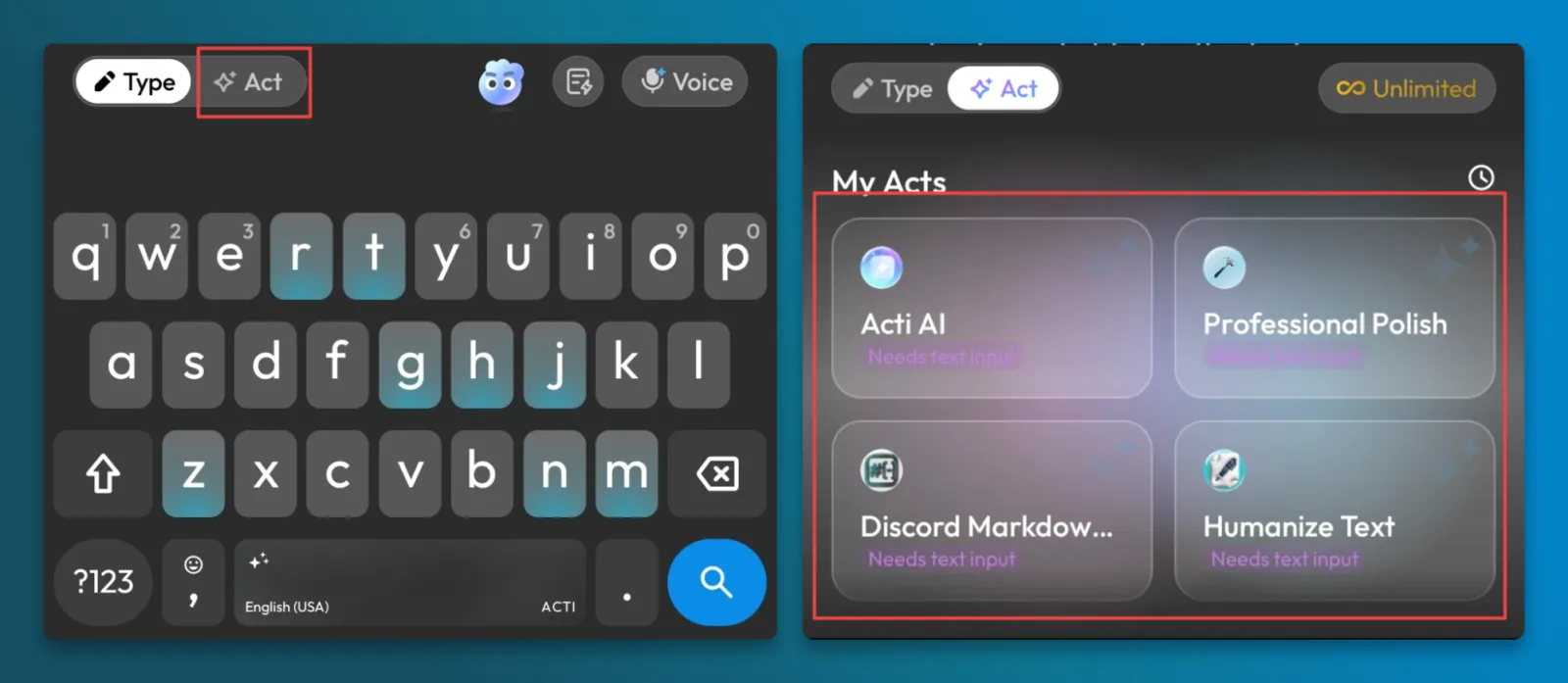
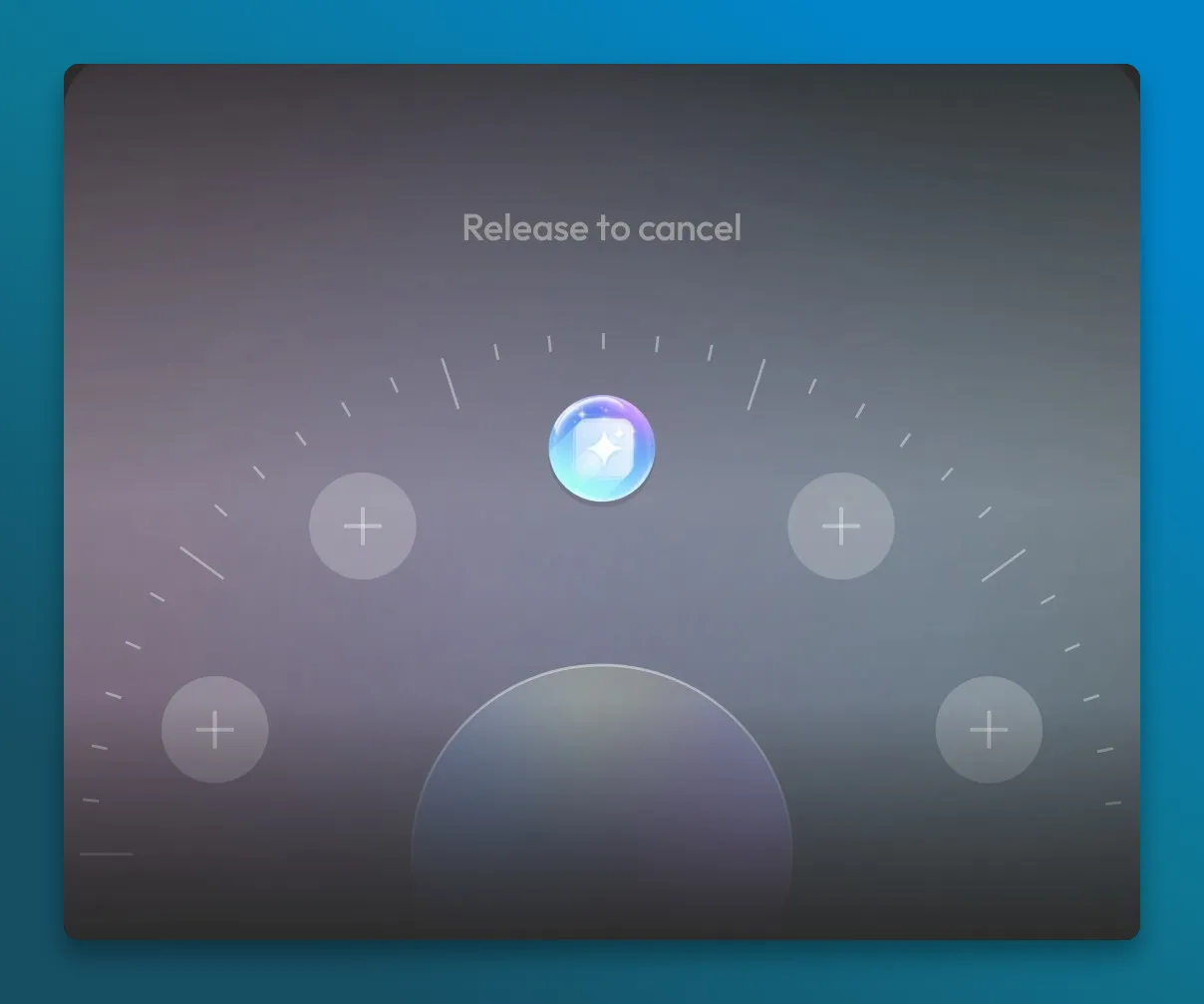
You can access your Acts through the Act Panel or add frequently used ones to the Acti Wheel.
To open the Wheel, hold the spacebar, keep holding while dragging toward the action, and release to select it. For cursor movement, use a direct spacebar swipe when that option is configured. openacti.com
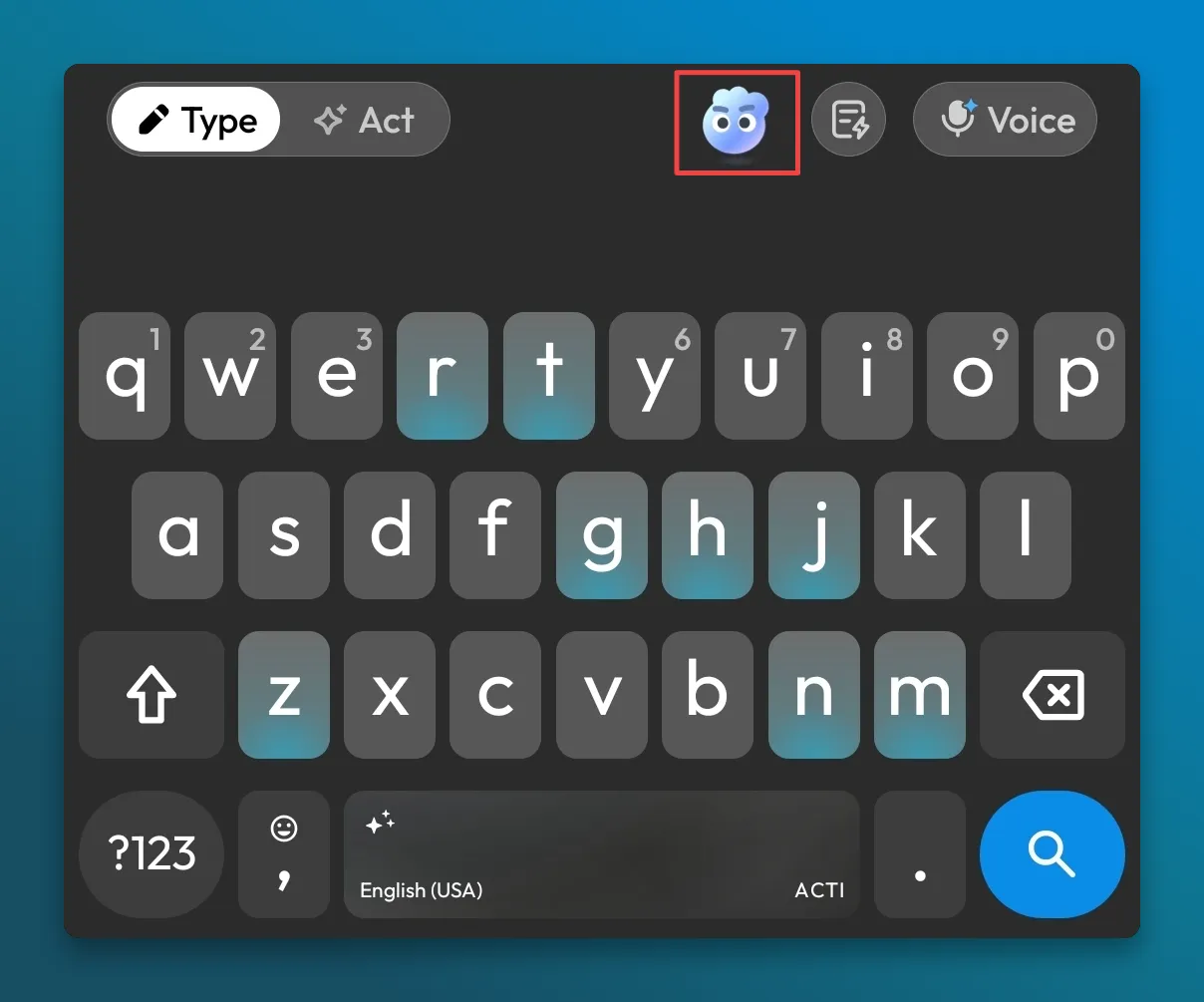
For questions and spoken instructions, tap Aki’s separate toolbar button.
And if you keep asking for the same kind of edit, make your own Act. Open the Acti app and describe the task to Acti Agent, refine it, test it, and save it. For example:
Make my work messages friendly and short. Keep the meaning and don’t add promises.
You can keep the Act private or share it through Acti Community. openacti.com
Gboard
Before installing another keyboard, check whether Gboard already offers the writing tools you need.
On supported phones and languages, it can proofread, rephrase, change tone, shorten, expand, and add emojis. Type your message, open Writing tools, choose an option, and review the result.
These tools aren’t available on every phone that runs Gboard. Google’s writing tools guide lists the supported devices and languages. support.google.com
Samsung Keyboard
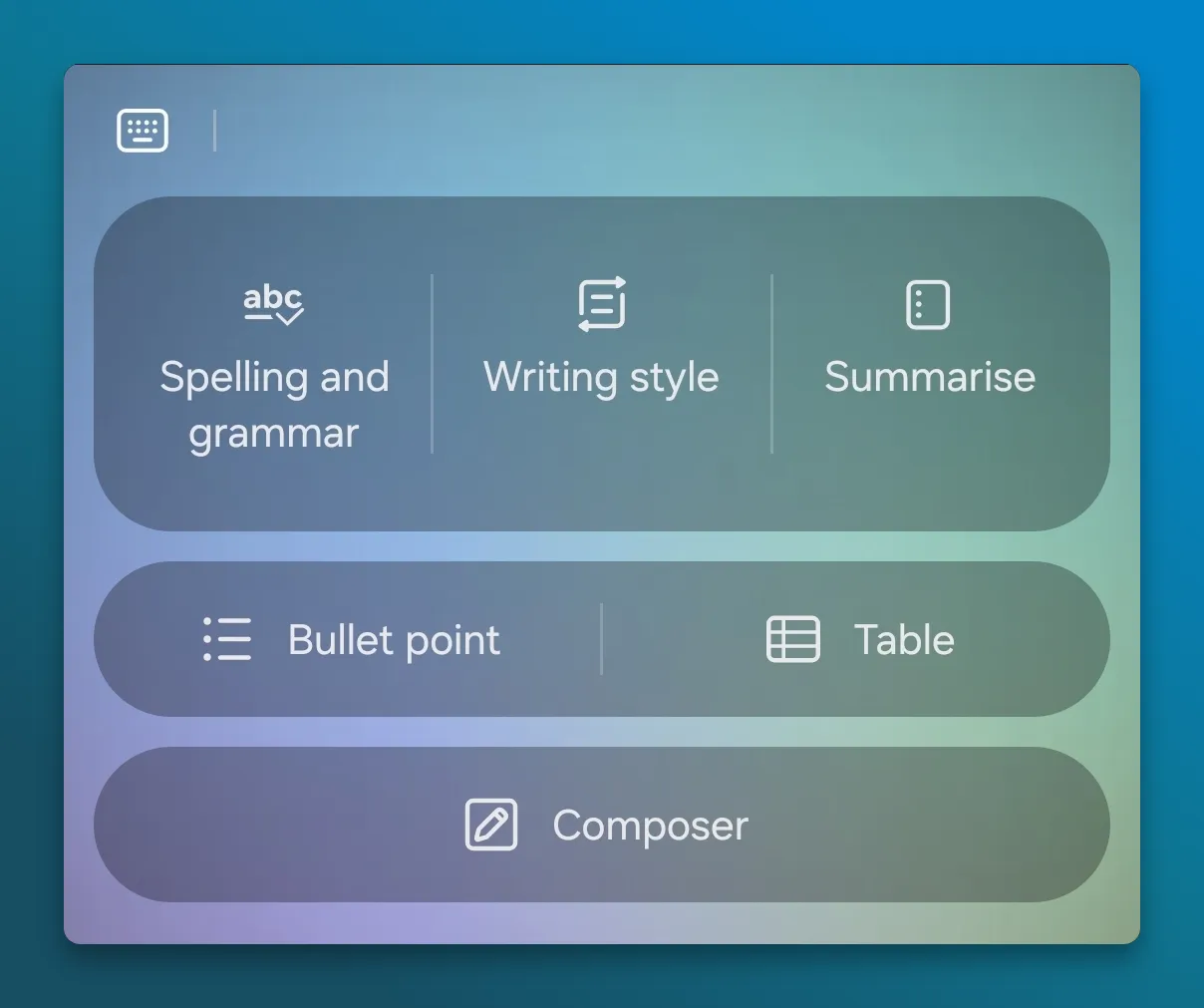
Compatible Galaxy devices offer Writing assist, also called Chat assist on some versions.
It includes spelling and grammar correction, writing styles, chat translation, and Composer. Look for its icon in the Samsung Keyboard toolbar. Availability depends on the device, software, language, and feature. www.samsung.com
Microsoft SwiftKey
SwiftKey has Editor for proofreading. If you find an older tutorial showing Copilot chat inside SwiftKey, check its date: Microsoft says the Copilot and Compose integrations were removed. support.microsoft.com
Good for: quick writing tasks while you are already composing a message.
The catch: a keyboard is a smaller workspace. For a long discussion or research session, you may prefer the ChatGPT app.
5. Keep ChatGPT beside your other app with split screen
Sometimes you want the full ChatGPT conversation visible while working on something else. On a compatible Android phone, split screen can help.
- Open ChatGPT and the other app.
- Go to your recent apps.
- Tap the app icon or menu above a card.
- Choose Split screen or a similar option.
- Select the second app.
Some phones also offer a pop-up view, which puts an app in a movable window. The steps vary by manufacturer, and not every app supports these modes.
On iPhone, you can switch between apps, but you don’t get the same two-app split-screen arrangement.
Good for: referring to a longer answer while writing or reading.
The catch: two apps plus a keyboard can make a phone screen feel very small.
How to use ChatGPT in WhatsApp
This is where the copy-and-paste routine gets especially annoying. You are already in a conversation, and opening another app breaks the flow.
There are two different things people mean by “ChatGPT in WhatsApp.”
Chat with ChatGPT as a contact
OpenAI currently lists its WhatsApp service as available in the EEA and Switzerland. Don’t assume it is available for an Indian WhatsApp number.
Even where it works, you are talking to ChatGPT in a separate conversation. It isn’t sitting inside the chat with your friend or colleague. chatgpt.com
Get help replying to someone else
You can copy a message into ChatGPT and explain what you want to say back.
Give it your intention, not just the message. For example:
Help me decline this invitation politely. Keep it short and don’t make up an excuse.
That gives it a better starting point than “reply to this.”
If you want help from the keyboard instead, select Acti, copy the received message, and run a reply Act. To improve your own draft, write it first and run a grammar or rewriting Act.
For a question or spoken instruction, open Aki through its toolbar button. Review the answer before putting it into the conversation.
What if you would rather speak?
Sometimes you don’t need help deciding what to say. You just don’t want to type a long message with your thumbs.
That is a job for dictation. If you want AI to answer a question or follow an instruction, use an assistant instead.
In Acti, these have separate buttons.
Acti Voice: turn speech into text
Tap the Voice button, speak, then choose:
- Transcribe to turn your speech into written text.
- Translate to produce text in another supported language.
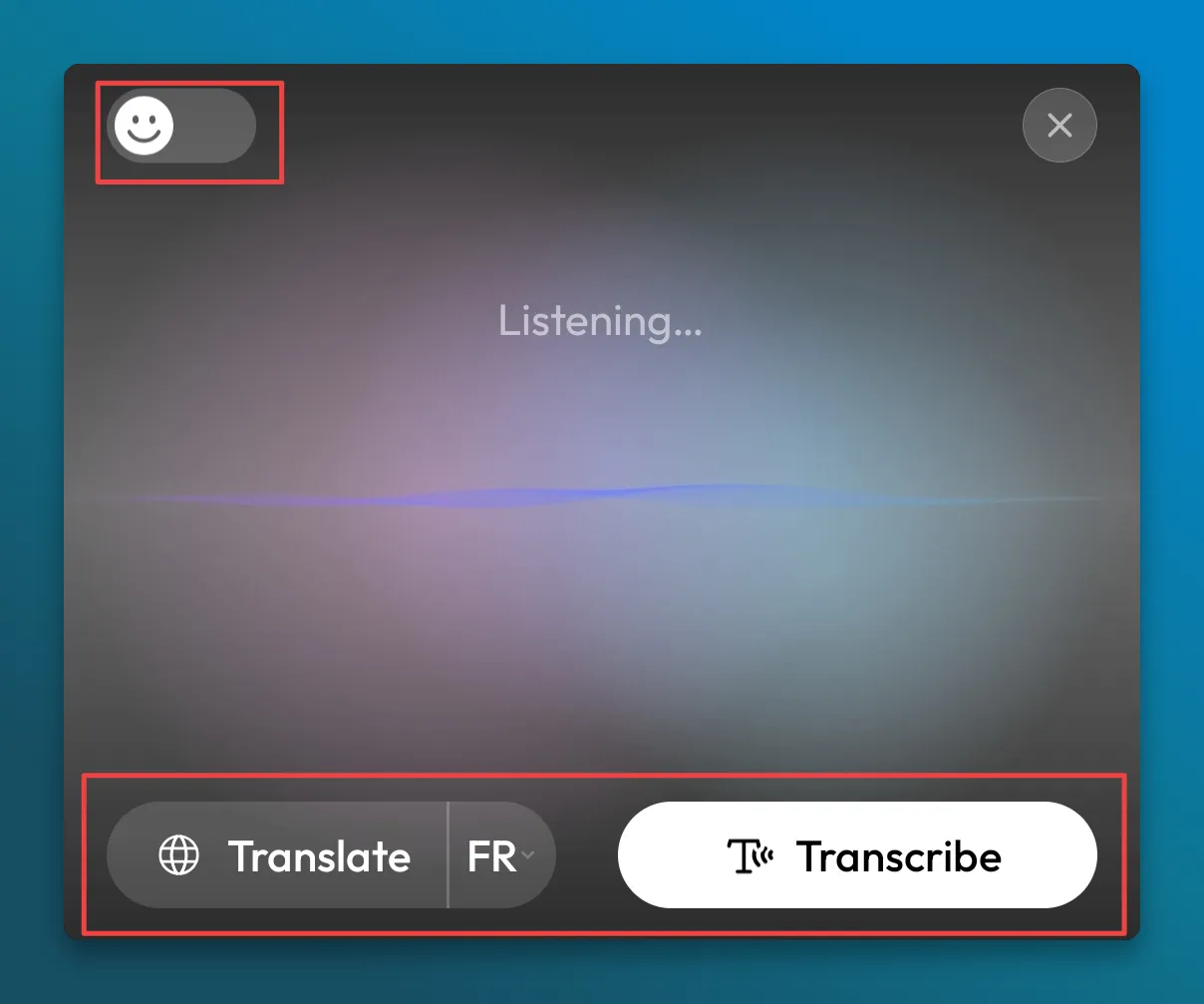
You can also choose how much processing you want. Raw follows your words, Clean lightly tidies them, and Smart improves the formatting and can fill in missing details when the context is clear.
Voice transcription currently doesn’t consume AI credits. The desktop app requires Acti Pro, including for dictation.
Aki: ask for something
Tap Aki’s separate toolbar button to ask a question or give instructions using your voice.
For example:
Write a short message saying I’ll call after lunch.
Here, you want Aki to write the message, rather than transcribe those instructions into your chat.
The Acti Voice page explains transcription and translation in more detail.
What happens to the text you send?
A tool appearing inside your keyboard doesn’t automatically mean it works offline.
Check the provider’s explanation of what it processes, whether it uses surrounding context, and what it stores. This matters for personal conversations and work messages alike.
With ChatGPT, review the privacy settings for your account and the particular feature you use. With a third-party keyboard, read its policy before enabling network access or other permissions.
Acti’s privacy policy says it doesn’t maintain a remote log of ordinary keystrokes. Its online features process relevant content and context, with storage depending on the feature and settings. Voice processing happens in the cloud, while dictation history is stored locally under the policy’s voice-specific rules. openacti.com
You don’t need to become a privacy expert to choose a keyboard, but you should know where to find these answers.
Which option should you try?
| What you want help with | An option to try |
|---|---|
| A longer conversation or research | ChatGPT app |
| Opening an assistant quickly on Android | Your available digital assistant shortcut |
| Writing with ChatGPT on a supported iPhone | ChatGPT through Apple Intelligence |
| Fixing a sentence or changing its tone | Your phone’s writing tools or an Act |
| Repeating the same writing instructions | A custom Act in Acti |
| Turning speech into a message | Keyboard dictation or Acti Voice |
| Asking a question out loud from Acti | Aki’s toolbar button |
| Keeping a long answer visible beside another app | Android split screen or pop-up view |
Start with the small task that keeps interrupting you. If it is fixing a sentence, try the writing tools already on your phone. If it is a longer conversation, use ChatGPT directly. If it is the same collection of replies, translations, and questions throughout the day, an AI keyboard may fit that routine.
Frequently asked questions
Can I add ChatGPT to my iPhone keyboard?
Not as an official replacement keyboard. On supported iPhones, you can use ChatGPT through Apple Intelligence. You can also install a third-party AI keyboard, but that is a separate product.
Can I use ChatGPT without opening its app?
Supported phone features and shortcuts can help you reach it from elsewhere. Apple’s ChatGPT extension is one example. On Android, check whether ChatGPT appears in your digital assistant settings.
Is Acti a ChatGPT keyboard?
Acti is its own product, not an official ChatGPT keyboard. It combines everyday typing with Aki, reusable Acts, transcription, and translation.
Can a keyboard read my whole WhatsApp conversation?
Don’t assume it can. The text you are typing, a message you copy, and information elsewhere on the screen are different inputs. For a reply workflow, you may need to copy the received message yourself.
Does Acti transcription use AI credits?
Voice transcription currently doesn’t consume AI credits. Desktop dictation requires Acti Pro.
Conclusion
You probably don’t want a “ChatGPT keyboard” just for the name. You want to fix a message, get an answer, or write a reply without turning it into a five-app exercise.
For longer conversations, keep ChatGPT close. For quick writing help, check what your phone already offers. And if you want those recurring tasks in the place where you type, explore Acti and try it on a few of your own messages.
Spotted something outdated or incorrect? Email us at help@openacti.com.